Disclosure: This article may contain affiliate links. We may earn a commission at no additional cost to you.
Table of Contents
ToggleINPHIC Tri-Mode – Best Wireless Mouse Review (2026)
Introduction
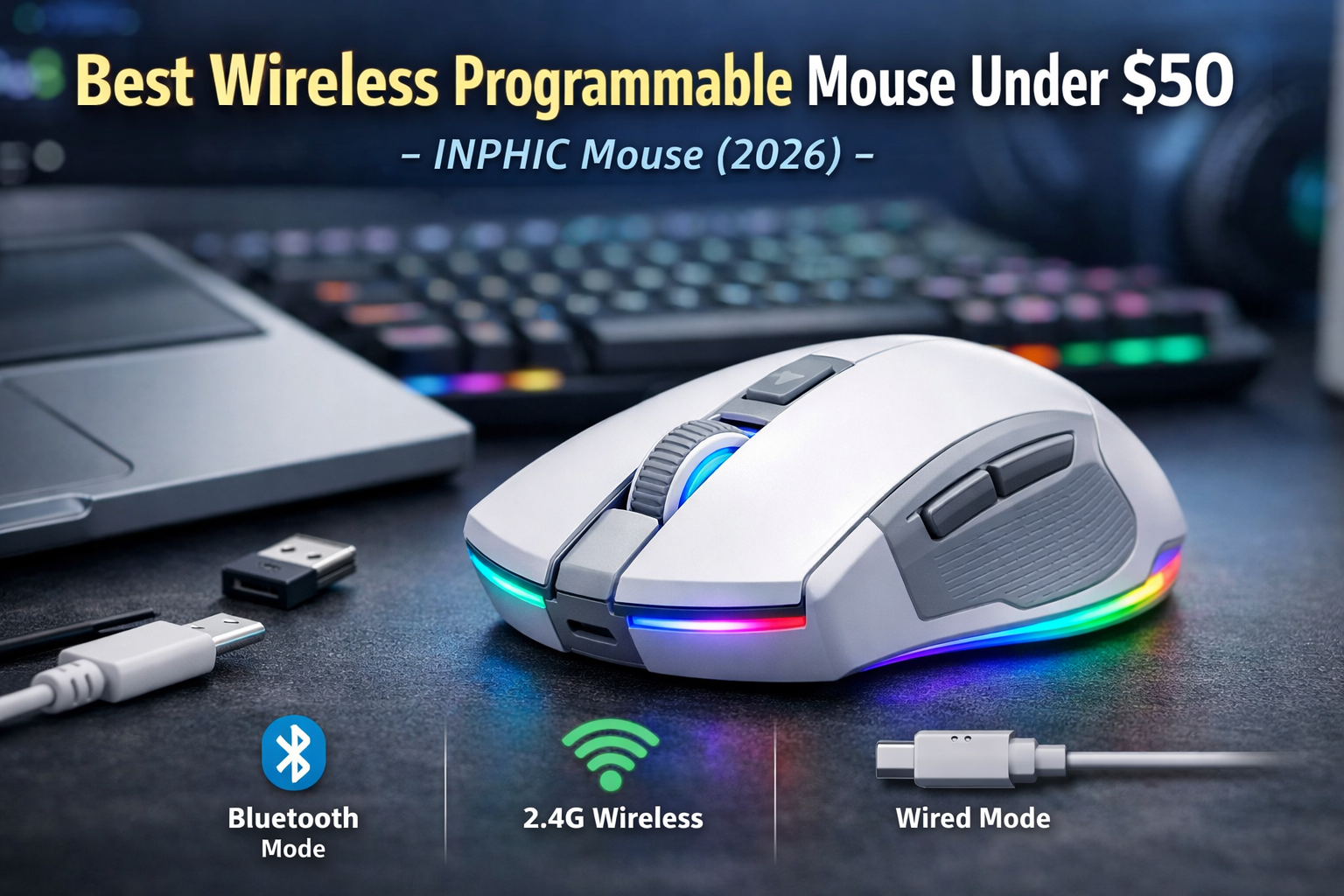
Wireless gaming mice have come a long way, especially in the budget segment. Features that were once reserved for premium models—like rechargeable batteries, RGB lighting, and multi-device connectivity—are now appearing in more affordable options. The INPHIC – Best Wireless Gaming Mouse stands out by offering true tri-mode connectivity, allowing you to switch between Bluetooth, 2.4G wireless, and wired Type-C modes.
On paper, it looks like an all-in-one solution for gaming, work, and everyday laptop use. But specifications don’t always tell the full story. In this review, we’ll break down how the INPHIC tri-mode mouse actually performs, who it’s best for, and whether it’s worth choosing over other budget wireless gaming mice in 2026.
Key Specifications at a Glance
Connectivity: Bluetooth, 2.4G wireless, Type-C wired
DPI: Up to 12,000 DPI (adjustable)
Battery: Rechargeable (built-in)
Lighting: RGB backlighting
Compatibility: Windows, macOS, laptops, PCs
Color: White with gray accents
Price range: Around $45 CAD (prices vary)
Design and Build Quality
The INPHIC mouse uses a clean white-and-gray color scheme that fits well with minimalist desk setups. It doesn’t look overly “gamery,” which makes it suitable for office or school environments while still offering RGB for users who want some visual flair.
The shell feels solid for its price range, though it’s clearly plastic-focused rather than premium-coated. Button placement is standard, and the shape leans toward a comfortable, neutral design that works well for palm and relaxed claw grips. It’s lightweight enough for long sessions without causing fatigue, but not ultra-light like competitive FPS mice.
Overall, the design prioritizes comfort and versatility rather than esports-level performance.
Tri-Mode Connectivity Explained
This is the mouse’s biggest selling point.
Bluetooth Mode
Bluetooth is ideal for laptops and productivity use. It offers good battery efficiency and stable performance for everyday tasks, browsing, and light gaming. Input latency is slightly higher than 2.4G wireless, but not noticeable outside of competitive play.
2.4G Wireless Mode
Using the USB receiver, 2.4G mode provides the best wireless performance for gaming. Cursor movement feels responsive, and for casual or semi-competitive gaming, it performs well. This is the mode you’ll want for most games.
Wired Type-C Mode
When plugged in, the mouse can be used while charging. Wired mode eliminates wireless latency and is useful if the battery runs low during long sessions.
Having all three options makes this mouse extremely flexible, especially for users who switch between devices or workspaces.
Gaming Performance
With a maximum DPI of 12,000, the INPHIC mouse offers more sensitivity options than most users will ever need. For casual gaming, single-player titles, and even lighter FPS play, tracking is consistent and smooth.
However, this mouse is not designed for competitive FPS players. While it performs well for its category, hardcore players who rely on ultra-low latency, lightweight designs, and top-tier sensors will likely want a more specialized mouse.
For casual gamers, beginners, and mixed-use setups, performance is more than adequate.
Battery Life and Charging
The built-in rechargeable battery is a major advantage over disposable battery mice. On a full charge, the mouse can last several days of normal use, depending on RGB brightness and connection mode.
Charging via Type-C is convenient, and the ability to use the mouse while charging means there’s no real downtime. Battery life is strongest in Bluetooth mode and slightly shorter in 2.4G wireless with RGB enabled.
Who This Mouse Is For
Users who want one mouse for work and gaming
Laptop users who value Bluetooth connectivity
Casual gamers and beginners
People who prefer a rechargeable wireless mouse
Minimalist desk setups that still want RGB options
Who Should Avoid It
Competitive FPS players
Esports-focused users
Those looking for ultra-lightweight mice
Players who need top-tier sensors for high-level play
Pros and Cons
Pros
True tri-mode connectivity
Rechargeable battery
Clean, versatile design
Good value for the feature set
Works well across multiple devices
Cons
Not ideal for competitive FPS
Plastic build feels budget
RGB slightly impacts battery life
Alternatives to Consider
If you’re focused purely on competitive gaming, a wired budget gaming mouse may offer better performance. If productivity is your main goal, a Bluetooth-only ergonomic mouse could deliver longer battery life. The INPHIC mouse sits in the middle, offering balance rather than specialization.
Frequently Asked Questions
Is the INPHIC tri-mode mouse good for gaming?
Yes, for casual and beginner gaming. It’s not designed for esports or high-level competitive play.
Can I use it with a laptop?
Absolutely. Bluetooth mode makes it ideal for laptops and portable setups.
Does it work while charging?
Yes, the mouse can be used in wired mode while charging.
Is the DPI adjustable?
Yes, DPI levels can be adjusted to suit different preferences.
Final Verdict
The INPHIC Wireless Tri-Mode Gaming Mouse delivers impressive versatility for its price. While it won’t replace a high-end competitive gaming mouse, it excels as a multi-purpose option for users who want wireless flexibility, rechargeable convenience, and solid performance in one package.
If you’re looking for a mouse that can handle work, casual gaming, and everyday use without constantly switching devices, the INPHIC tri-mode mouse is a practical and well-rounded choice in 2026.
Want to see how this mouse compares to other budget-friendly options?
Check out our Top 5 Best Gaming Mouse Under 40$